Running a professional online examination website requires much more than publishing a few multiple-choice questions. An educator needs a structured way to create courses, organise subjects and tests, upload questions, enrol students, collect payments, control access, display results and keep the entire experience easy to use on mobile devices. The Tech Codi Test Series Plugin is designed to bring these essential functions together inside WordPress.
Instead of forcing teachers and coaching institutes to combine many unrelated systems, the plugin provides a focused workflow for an educational test-series business. Administrators can build courses, create subject-wise or chapter-wise tests, manage objective questions, publish free or paid access and give students a dedicated dashboard. Learners can register, purchase or join a course, attempt tests and review their performance through a simple online interface.
The Tech Codi Test Series Plugin for WordPress is especially useful for websites that publish competitive examination practice, teacher recruitment mock tests, nursing entrance tests, school-level assessments and other objective test series. It can support categories such as BPSC TRE, STET, CTET, ANM, GNM, general studies, science, mathematics, language and subject-specific practice. The administrator remains responsible for selecting the correct syllabus, validating questions and configuring the website for the intended learners.
IMAGE NAME: tech-codi-test-series-plugin-wordpress-hero.jpg
IMAGE TYPE: Professional hero banner showing a WordPress education website on a laptop, an online test on a tablet and a student dashboard on a phone.
RECOMMENDED SIZE: 1600 × 900 pixels (16:9)
ALT TEXT: Tech Codi Test Series Plugin for WordPress online exams and courses
PLACEMENT: Immediately below the introduction.
What Is the Tech Codi Test Series Plugin?
The Tech Codi Test Series Plugin is a WordPress-based education solution for creating and managing online courses and objective examinations. It gives a website owner an organised relationship between a course, its subjects, its tests and the questions inside each test. This structure makes it easier for students to understand what they have purchased and what they should attempt next.
For example, an administrator can create a course for BPSC TRE preparation, add subjects such as General Studies, English, Hindi, Mathematics or the relevant teaching subject, and then add multiple tests inside each subject. A separate course can be created for STET, CTET, ANM or another examination. Students see only the courses and tests for which they have access, while administrators manage the content from the WordPress dashboard.
The plugin is intended to function as a specialised WordPress Test Series Plugin. Its purpose is not to turn a test into an ordinary blog post or a general shopping product. It creates an education-focused journey in which course discovery, registration, payment, access, examination and result review are connected.
Who Can Use the Tech Codi Test Series Plugin?
The plugin can be used by individual teachers, coaching centres, educational content creators, test-preparation publishers and training organisations. It is suitable for both a small website launching its first free mock test and a growing platform with multiple paid courses.
- Individual educators: Publish topic-wise quizzes and sell a structured test series under a personal brand.
- Coaching institutes: Give enrolled students access to online practice tests outside the classroom.
- Competitive exam platforms: Organise previous year papers, weekly mock tests and full-length test series.
- Nursing and healthcare educators: Create ANM, GNM, staff nurse and subject-wise medical or health tests.
- Teacher exam websites: Publish BPSC TRE, Bihar STET, CTET and pedagogy test series.
- Schools and training centres: Conduct practice assessments and monitor results.
- Educational publishers: Convert verified question banks into interactive digital tests.
A website owner does not need to present every type of examination. The best experience is usually created by choosing a clear audience and organising the test library around that audience’s syllabus and goals.
IMAGE NAME: who-can-use-tech-codi-test-series-plugin.jpg
IMAGE TYPE: Educational infographic featuring an individual teacher, coaching institute, exam publisher and students.
RECOMMENDED SIZE: 1400 × 900 pixels
ALT TEXT: Educators and coaching institutes using Tech Codi Test Series Plugin
PLACEMENT: After the target-user section.
Why Build an Online Test Series Website with WordPress?
WordPress gives educators ownership and flexibility. A website owner can control the domain, design, educational content, pricing, pages and student experience. A purpose-built Online Exam Plugin for WordPress adds the testing functions that standard WordPress does not provide by default.
This combination can be attractive for educators who do not want their courses to exist only on a third-party marketplace. A branded website allows direct communication with learners, search-engine visibility, custom landing pages and a consistent identity across free content, courses and tests.
WordPress also provides a familiar publishing environment. The administrator can create explanatory articles, syllabus pages, free preparation material and course pages on the same website. The test-series system then converts interested readers into registered students and test takers.
Benefits of a Self-Managed WordPress Test Platform
- Use your own domain and educational brand.
- Create exam-specific course and test structures.
- Publish free content for search traffic and paid content for enrolled students.
- Control course descriptions, prices and access duration according to the configured version.
- Manage students and results from the website administration area.
- Improve the design as the platform grows.
- Add examination categories without creating a separate website for each one.
- Maintain a direct relationship with learners.
Core Features of the Tech Codi Test Series Plugin
The plugin brings together the major components required for an online test-series workflow. Available controls may vary by the installed version and configuration, so the site owner should verify the feature list and test every workflow before launch.
| Feature Area | What It Does | Benefit for the Website |
|---|---|---|
| Course Management | Creates free or paid course entries with descriptions, prices and access settings | Turns separate tests into a clear product or learning programme |
| Subject and Test Organisation | Groups tests by subject or learning structure | Makes a large test library easier to navigate |
| Question Management | Adds, edits, removes and reuses objective questions | Keeps the question bank manageable |
| Bulk Upload | Imports supported question files in the configured format | Saves time when publishing large question sets |
| Student Registration and Login | Provides a dedicated learner account flow | Keeps test access and results linked to each student |
| Course Access | Controls which students can open paid or restricted tests | Protects premium educational content |
| Payments | Supports the configured online, free or manual enrolment workflow | Connects course purchase with student access |
| Timed Test Interface | Presents questions, options, navigation and a timer | Creates an exam-oriented practice experience |
| Results and Solutions | Displays score, answer status and available explanations | Turns every attempt into a learning opportunity |
| Student Dashboard | Shows accessible courses and relevant learner activity | Gives students a central place to continue learning |
| Leaderboard | Ranks eligible test performance according to configured rules | Adds motivation and competitive comparison |
| Mobile-Responsive Design | Adapts important pages and test controls to smaller screens | Allows students to practise from phones and tablets |
IMAGE NAME: tech-codi-test-series-plugin-features-dashboard.jpg
IMAGE TYPE: Feature overview graphic showing Course, Questions, Students, Payments, Results and Leaderboard modules.
RECOMMENDED SIZE: 1600 × 1000 pixels
ALT TEXT: Tech Codi Test Series Plugin features for WordPress
PLACEMENT: After the core feature table.
Create and Sell Online Courses
A course is the main container through which the plugin presents learning and testing content to students. The administrator can give the course a meaningful title, description, featured image, price and other available settings. A course page explains what students will receive before they enrol.
For example, a course named “BPSC TRE 4.0 Complete Mock Test Series” can include a description of the target examination, subjects, number of tests, test language and intended learner level. The course should not make guaranteed-result claims. It should accurately describe the content actually available.
Free Courses
A free course can be used to introduce students to the platform. It may contain sample tests, a weekly quiz or a limited collection of practice papers. The access flow should allow an eligible logged-in student to join without being forced through an unnecessary payment process.
Paid Courses
A paid course can contain premium subject tests, previous year papers, full-length mock tests or a complete examination programme. The course page should display the price clearly and explain the included content. After successful payment or authorised manual enrolment, the student should receive access according to the configured rules.
Manual Course Access
Some educators accept payments or enrolments outside the online gateway. An administrator-controlled access option can be used to grant a course to the correct student after verification. This is useful for offline students, promotional access or support cases, but the administrator should maintain proper records.
IMAGE NAME: tech-codi-course-page-free-paid-access.jpg
IMAGE TYPE: Side-by-side course-page mockups showing a free course button and a paid course purchase button.
RECOMMENDED SIZE: 1400 × 900 pixels
ALT TEXT: Free and paid course pages in Tech Codi Test Series Plugin
PLACEMENT: After the course access section.
Organise Courses by Subject and Test
A large course becomes confusing when all tests are displayed in one unstructured list. The Tech Codi Test Series Plugin allows course content to be organised through subjects and tests. Students can open a course, select a subject and see the available tests inside that subject.
Subject names should be descriptive. Use “Physics,” “Chemistry,” “Biology,” “Child Development and Pedagogy,” “English” or “General Studies” instead of labels such as “Subject 1.” Where useful, the course dashboard can display the number of tests available beside each subject name.
This organisation supports many content models:
- Subject model: Course → Subject → Tests
- Chapter model: Course → Chapter → Topic Tests
- Weekly model: Course → Week → Scheduled Mock Tests
- Difficulty model: Course → Foundation, Intermediate and Advanced Tests
- Paper model: Course → Paper or Section → Practice Tests
- Previous year model: Course → Examination Year → Previous Year Tests
The administrator should choose one clear model per course and apply consistent names. Predictable organisation reduces support requests and helps students continue from where they stopped.
Build a Reusable Question Bank
Question management is the foundation of every WordPress Online Test Plugin. The Tech Codi system allows administrators to add objective questions, arrange options, set the correct answer and provide a solution where required. Questions should be written clearly and reviewed before being assigned to a live test.
A reusable question bank saves time. Instead of recreating the same verified question for every test, the administrator can manage questions centrally and attach the appropriate set to a test according to the available workflow. Individual editing is important because a single spelling error, incorrect option or outdated fact should be correctable without rebuilding an entire question file.
Four-Option and Five-Option Questions
Different examinations use different question structures. Standard objective tests commonly use four options, while some papers or specialised formats may require five. A configurable question system can support the option structure required by the test. The administrator must ensure that every question displays the intended number of options and that the correct answer refers to the correct option.
Question Validation Matters
Technology can publish questions quickly, but it cannot replace editorial responsibility. Every question should be checked for factual accuracy, unambiguous wording, correct options, correct answer and an explanation that supports the answer. Previous year questions should be labelled honestly and should not be mixed with newly written questions under a misleading title.
IMAGE NAME: wordpress-question-bank-four-five-options.jpg
IMAGE TYPE: Admin-interface mockup showing a question editor with five option fields, correct-answer selector and solution box.
RECOMMENDED SIZE: 1500 × 950 pixels
ALT TEXT: WordPress question bank with four and five option support
PLACEMENT: After the question validation section.
Bulk Question Upload for Faster Test Creation
Manual entry is useful for individual corrections and small quizzes, but a large test series may contain thousands of questions. A bulk question upload workflow reduces repetitive data entry by importing questions from a supported file format. Depending on the installed version and configured importer, the system may accept structured CSV or DOCX input prepared according to the required template.
A bulk file generally needs separate fields for the question, options, correct answer and solution. If the examination uses five options, the fifth option column must be included. The exact headers and answer format should follow the importer template supplied with the plugin.
Bulk Upload Best Practices
- Download or copy the latest supported template before preparing questions.
- Do not rename required column headers unless the importer instructions allow it.
- Use consistent answer values such as A, B, C, D or E according to the template.
- Remove accidental question numbers if the plugin generates numbering automatically.
- Check that no option has shifted into the wrong column.
- Keep formatting simple unless mathematical or supported rich content is required.
- Import a small sample before uploading a very large question bank.
- Review imported questions in the administration area.
- Attempt the test as a student before making it public.
- Maintain a backup copy of the validated source file.
Bulk upload saves time only when the source data is clean. Importing an unverified file can multiply errors across many tests. Editorial validation should therefore happen before and after import.
IMAGE NAME: bulk-question-upload-csv-docx-wordpress.jpg
IMAGE TYPE: Process infographic: Prepare CSV/DOCX → Validate Columns → Upload → Review Questions → Attach to Test.
RECOMMENDED SIZE: 1600 × 900 pixels
ALT TEXT: Bulk question upload workflow for WordPress test series
PLACEMENT: After the bulk upload best practices.
Mathematical Formula Support for Book-Style Questions
Mathematics and science questions often lose meaning when fractions, roots, powers or symbols are displayed incorrectly. A suitable configuration of the Tech Codi Test Series Plugin can render mathematical notation through a supported formula-rendering system such as MathJax or KaTeX. This allows questions and options to display structured mathematical expressions instead of difficult plain-text approximations.
Formula support can be useful for fractions, square roots, cube roots, indices, logarithms, equations, matrices, sets, vectors, summation, integration, limits, trigonometric expressions and Greek symbols. The same rendering should be checked on the test page, result page and mobile screen so that students see a consistent expression before and after submission.
An administrator-friendly formula toolbar can further simplify question entry by providing buttons for common symbols and templates. Editors should still preview every mathematical question. A valid formula can become unreadable if it overflows a small screen or is entered with incomplete notation.
IMAGE NAME: math-formula-online-test-wordpress-plugin.jpg
IMAGE TYPE: Book-style mathematics question rendered on desktop and mobile, including a fraction, square root and exponent.
RECOMMENDED SIZE: 1400 × 900 pixels
ALT TEXT: Mathematical formula rendering in WordPress online test plugin
PLACEMENT: At the end of the mathematical formula section.
Student Registration and Login Experience
A test-series website needs a learner-friendly account system. Students should be able to register with the required details, sign in securely and reach their dashboard without entering the general WordPress administration area. The exact registration fields depend on the configured version; common educational workflows may use a student name, mobile number and password.
When a visitor clicks a paid course action without being signed in, the website can direct the visitor to login or registration before continuing. After authentication, the student should return to the relevant course or payment flow rather than becoming lost on an unrelated page.
Good Login Experience Principles
- Use clear “Login” and “Create Account” labels.
- Show helpful validation messages for missing or incorrect information.
- Do not expose the WordPress admin bar or backend to ordinary students.
- Provide a secure password-reset or account-recovery process where available.
- Return students to the intended course after authentication.
- Keep the mobile form readable and easy to submit.
- Publish a privacy policy explaining what student data is collected and why.
Course Payment and Access Control
The commercial workflow of a paid test series must connect payment status with course access. The plugin can work with its configured payment method, including a supported online gateway such as Razorpay where enabled, as well as free or manually authorised access.
After a successful payment, the correct student should receive access to the purchased course. A pending or failed transaction should not silently unlock premium tests. Webhook or payment verification settings must be configured securely according to the payment provider’s documentation.
Important Payment Page Information
- Course name and price
- What the student receives
- Applicable access duration, if limited
- Payment status and reference information
- Support contact for payment problems
- Refund or cancellation policy, where applicable
- Terms of use and privacy policy links
Avoid claiming that payment is successful merely because the student returned to the website. Server-side verification or the supported provider workflow should confirm the transaction. The website owner should also test successful, failed, cancelled and delayed-payment scenarios before accepting live orders.
IMAGE NAME: razorpay-course-payment-test-series-plugin.jpg
IMAGE TYPE: Clean course checkout illustration showing course summary, secure payment and access confirmation.
RECOMMENDED SIZE: 1400 × 900 pixels
ALT TEXT: Course payment and access in Tech Codi Test Series Plugin
PLACEMENT: After the payment verification explanation.
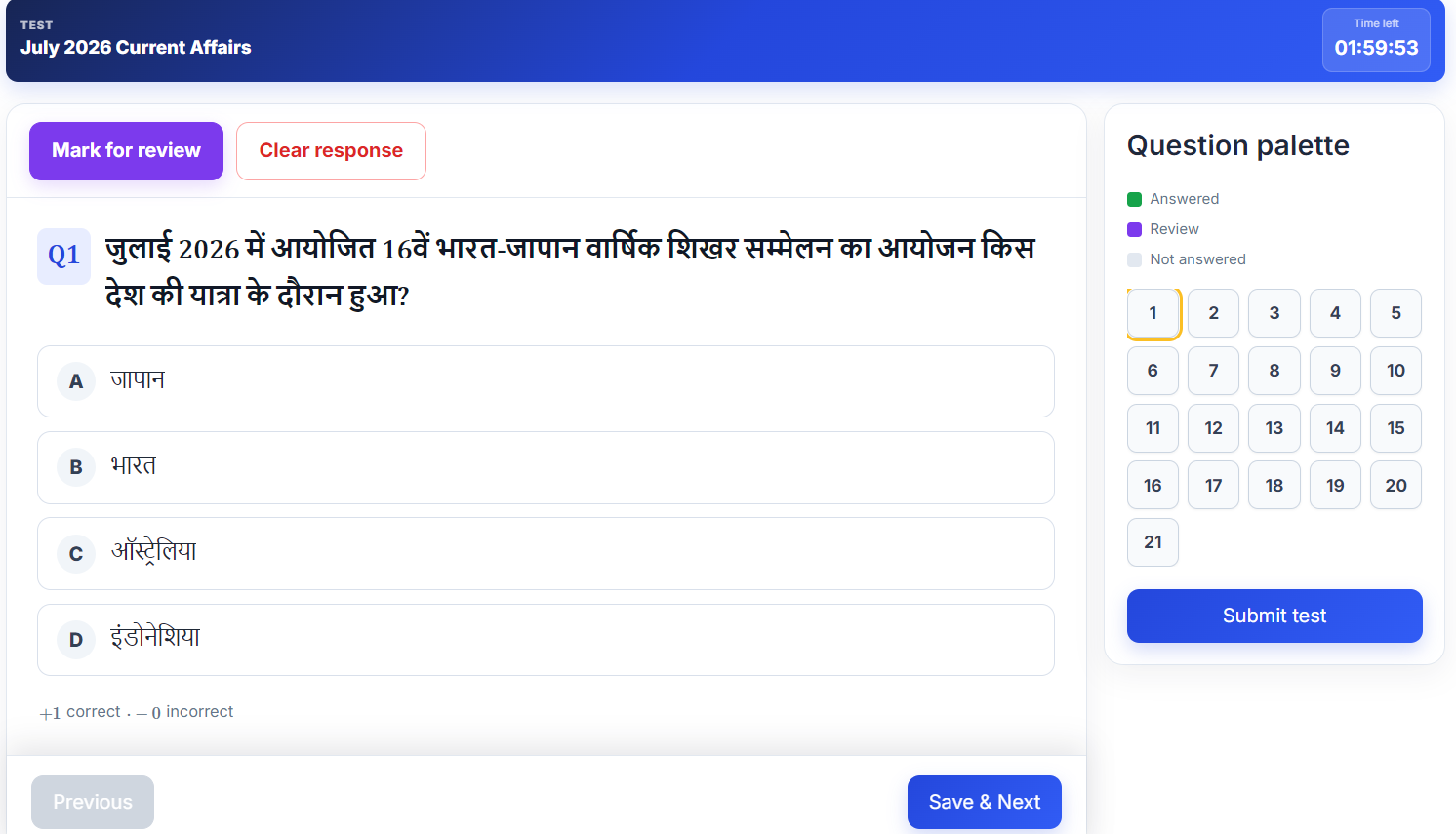
Exam-Style Online Test Interface
The test page is where students spend most of their active time. It should keep attention on the question instead of surrounding website clutter. The Tech Codi Test Series Plugin presents an objective-test workflow with questions, answer options, navigation, timing and submission controls according to the configured test.
A visible or sticky timer helps students understand how much time remains. Question navigation should make it easy to move forward, return to an earlier question and understand which questions have been attempted. The final submit action should be clear and, where appropriate, protected by a confirmation message.
Elements of a Student-Friendly Test Page
- Readable question typography
- Clearly separated answer options
- Stable question numbering
- Visible timer for timed tests
- Previous and Next navigation
- Question palette or attempt status where enabled
- Mark-for-review control where supported
- Submit confirmation
- Responsive layout for mobile devices
- Formula and bilingual-text compatibility where configured
The administrator should attempt every new test from a student account on both desktop and mobile. This catches problems that may not be visible in the question editor, such as clipped text, missing options, formula overflow or a timer hidden behind the website header.
IMAGE NAME: tech-codi-online-test-interface-timer.jpg
IMAGE TYPE: Realistic test interface mockup with one objective question, five options, timer, question palette and navigation buttons.
RECOMMENDED SIZE: 1600 × 1000 pixels
ALT TEXT: Tech Codi online test interface with timer and navigation
PLACEMENT: After the online test interface section.
Automatic Results and Answer Review
After submission, students need more than a total score. A useful result page should help them understand which questions were correct, incorrect or unanswered. It should distinguish the student’s selected option from the correct option and display an explanation when one is available.
This review process turns an online exam into a learning tool. A student can revisit difficult questions, identify weak topics and attempt another related test. Administrators can use result data to judge whether questions are too easy, too difficult or frequently misunderstood.
Useful Result Information
- Total score or marks obtained
- Number of correct answers
- Number of incorrect answers
- Number of unanswered questions
- Accuracy or percentage where configured
- Completion status and submission time
- Student-selected option
- Correct option
- Question solution or explanation
Negative marking, pass marks and score formulas must match the intended examination and test settings. The administrator should manually verify calculation with a small sample test before publication.
AI-Assisted Question Solutions
An AI solution feature can help administrators draft explanations for questions when a supported AI service is configured. In an applicable version of the plugin, a service such as the Gemini API may be connected to generate a proposed solution. This can reduce the time required to prepare explanations for a large question bank.
AI-generated content must not be published without review. A fluent explanation can still contain a factual error, an incorrect formula or an answer that does not match the question. The administrator or subject expert should validate every AI-generated solution before students rely on it.
Safe AI Solution Workflow
- Create or import a verified question and answer.
- Generate a draft solution through the configured AI service.
- Compare the solution with a reliable source or subject expert.
- Correct reasoning, terminology, calculation and language.
- Save the approved solution.
- Clearly distinguish generated drafts from reviewed solutions in the administration workflow.
AI should support editorial work, not replace it. This is particularly important for health, law, current affairs and examinations in which an outdated detail can change the answer.
IMAGE NAME: ai-question-solution-wordpress-test-plugin.jpg
IMAGE TYPE: Workflow graphic showing Question → AI Draft → Expert Review → Published Solution.
RECOMMENDED SIZE: 1500 × 900 pixels
ALT TEXT: AI-assisted question solution workflow for online test plugin
PLACEMENT: After the safe AI solution workflow.
Student Dashboard for Courses and Results
A dedicated student dashboard gives learners a central place to continue their preparation. Instead of searching the website for a purchased course every time, the student can log in and view the available course cards, open subjects, attempt tests and review recent results.
The dashboard should prioritise useful information. Large decorative cards that do not help the learner can create confusion, especially on mobile. Course cards, subject names, test counts, completion status and recent results should be easy to understand. Consistent full-width or responsive cards can improve readability across screen sizes.
A clean dashboard may include:
- Accessible or purchased courses
- Subject names and available test counts
- Completed and pending test status
- A limited list of recent results
- Account or profile controls
- Order or payment information where relevant
- Direct links to continue a course
IMAGE NAME: tech-codi-student-dashboard-courses-results.jpg
IMAGE TYPE: Responsive student dashboard mockup with course card, Physics and Chemistry subject rows, test counts and recent results.
RECOMMENDED SIZE: 1600 × 1000 pixels
ALT TEXT: Tech Codi student dashboard with courses subjects and results
PLACEMENT: At the end of the student dashboard section.
Leaderboard and Student Motivation
A leaderboard can display student performance in rank order according to the configured calculation. It can encourage regular practice and create a sense of competition. The ranking logic should be transparent and should use relevant measures such as valid marks, score or examination rules.
A useful leaderboard should avoid duplicate entries or unrelated cards. It should show the rank, student display name and the relevant score or marks. If performance is combined across several tests or the entire website, the aggregation method should be explained so that students understand how ranking is calculated.
Privacy also matters. Display only the information necessary for the educational purpose. Do not expose phone numbers, email addresses or sensitive account details.
Mobile-Responsive Test Series Experience
Many students prepare primarily through a smartphone. A WordPress Mock Test Plugin must therefore work beyond the desktop screen. Course listings, login forms, dashboard cards, test options, timers, result tables and navigation buttons should adapt to smaller widths.
Responsive design is not simply shrinking the desktop page. Text must remain readable, buttons must remain easy to tap and important controls must not overlap. A test page should not send a student back to a static homepage because of a mobile routing problem. Every course and dashboard URL should be tested directly on common mobile browsers.
Mobile Testing Checklist for Administrators
- Open the course archive and an individual course page.
- Register and log in using a phone.
- Complete a free-course enrolment.
- Test the payment flow in an authorised test environment.
- Open subjects and start a test.
- Check long questions and five-option layouts.
- Verify that the sticky timer does not cover content.
- Submit the test and inspect the result page.
- Check mathematical formulas and bilingual text.
- Confirm that dashboard and leaderboard cards fit the screen.
IMAGE NAME: mobile-responsive-tech-codi-test-series.jpg
IMAGE TYPE: Three smartphone screens showing course list, active mock test and result review.
RECOMMENDED SIZE: 1200 × 1200 pixels
ALT TEXT: Mobile responsive Tech Codi Test Series Plugin experience
PLACEMENT: After the mobile testing checklist.
Create BPSC TRE, STET and CTET Test Series
The plugin can be used to organise teacher-examination practice on a WordPress website. An administrator can create separate courses for BPSC TRE, Bihar STET and CTET so that students do not see unrelated tests mixed together. Each course can contain the subjects and test types appropriate to the target paper.
BPSC TRE Test Series
A BPSC TRE course may include language practice, general studies, subject-specific tests, previous year questions and full-length mock tests according to the current official notification. Test titles should state the recruitment phase or target level clearly when relevant.
Bihar STET Mock Test Series
A STET course can be organised by paper and subject. The administrator should compare every test with the latest official syllabus and should avoid reusing old pattern labels without verification.
CTET Online Test Series
A CTET course can contain paper-specific child development, language, subject content and pedagogy tests. Classroom-situation questions should include carefully reviewed explanations so that students understand the educational principle behind the answer.
The Tech Codi Test Series Plugin provides the publishing system, but the website owner remains responsible for examination accuracy. Official notifications should be the final authority for syllabus, marks, timing, negative marking, eligibility and other rules.
Create ANM, Nursing and Healthcare Mock Tests
The same course structure can support ANM, GNM, staff nurse and other health-related practice. Courses may be organised by subject, such as Community Health Nursing, Child Health Nursing, Midwifery, Health Promotion, Primary Health Care or Anatomy and Physiology.
Health questions require especially careful validation. Explanations should use reliable and current sources, and content should remain educational rather than being presented as personal medical advice. When official nursing exam syllabi differ by recruitment, tests should be labelled accordingly.
Course and Test Content Workflow
A disciplined publishing workflow prevents mistakes and keeps a large website organised. The following sequence can be used as a practical model:
- Define the examination: Select the exact exam, paper, subject and learner level.
- Verify the syllabus: Use the current official notification or recognised curriculum.
- Create the course: Add an accurate title, description, image and pricing.
- Create subjects: Use meaningful subject or chapter names.
- Prepare questions: Write or extract questions according to authorised and reliable sources.
- Validate answers: Review every option, answer and solution.
- Import or enter questions: Use bulk upload or manual entry.
- Create tests: Set titles, timing, scoring and other available controls.
- Attach questions: Confirm the intended question count and order.
- Preview as a student: Test desktop and mobile workflows.
- Publish carefully: Make the course or test visible only after quality checks.
- Monitor results and feedback: Correct reported errors and improve future tests.
IMAGE NAME: online-test-series-publishing-workflow.jpg
IMAGE TYPE: Vertical workflow infographic from syllabus verification to published online test and student feedback.
RECOMMENDED SIZE: 1000 × 1800 pixels
ALT TEXT: Online test series content creation and publishing workflow
PLACEMENT: After the content workflow steps.
How to Set Up the Tech Codi Test Series Plugin
The exact setup screens depend on the plugin version. Use the documentation supplied with the installed package and test the website on a staging copy before making major changes to a live site.
Step 1: Prepare WordPress
Use a supported WordPress and PHP environment, a valid SSL certificate and a mobile-responsive theme. Create a complete backup before installation or upgrade. Remove abandoned or conflicting test plugins only after confirming that their data is no longer needed.
Step 2: Install and Activate the Plugin
Upload the authorised plugin ZIP through the WordPress plugin installer and activate it. If activation produces a critical error, disable the plugin through the available recovery method and inspect the WordPress debug log or hosting error log before trying again.
Step 3: Configure Required Pages
Confirm the course archive, individual course, student login, registration, dashboard, payment, result and leaderboard pages used by the plugin. Save WordPress permalinks if a new course detail page returns a not-found error.
Step 4: Configure Payment
Enter the authorised payment credentials in the correct environment and configure verification or webhook settings according to the provider. Never publish secret keys in an article, screenshot or public support message.
Step 5: Create a Sample Course
Create one test course with one subject, one test and a small set of questions. Use it to validate the complete workflow before importing a large library.
Step 6: Test Every Student Journey
Test registration, login, free access, paid access, manual enrolment, test submission, result review, logout and mobile behaviour. Use a separate student account rather than testing only while logged in as an administrator.
Website Pages Recommended for a Test Series Business
| Page | Purpose | Recommended Content |
|---|---|---|
| Home | Introduces the platform | Main exam categories, benefits, free test CTA and popular courses |
| Courses | Displays available courses | Course cards with title, image, price and View Details button |
| Course Details | Explains one course | Description, subjects, test information, price and enrolment action |
| Free Mock Tests | Attracts new learners | Exam-wise sample tests and clear start buttons |
| Student Login | Authenticates learners | Simple login and registration links |
| Dashboard | Central student area | Courses, subjects, test counts, completion and recent results |
| Leaderboard | Shows performance ranking | Rank, student name, relevant marks and ranking explanation |
| About | Builds trust | Organisation, educator background and editorial process |
| Contact and Support | Handles student problems | Support form, response expectations and payment-help process |
| Policies | Explains legal and data practices | Privacy, terms, refund, disclaimer and cookie information |
SEO Benefits of an Organised Test Series Website
The plugin itself does not guarantee search-engine rankings, but a clear website structure can support useful content. Each exam category can have an informative landing page. Each course can have a unique description. Preparation articles can link naturally to relevant free tests and courses.
Search engines and users both benefit when pages have a clear purpose. Avoid copying the same description across every course. Write original content explaining the examination, target audience, included subjects and test value. Do not hide important information behind vague promotional language.
SEO Content Ideas for a Test Website
- BPSC previous year mock test guides
- Latest syllabus explanation based on official notices
- Subject-wise preparation strategies
- Free online mock test landing pages
- How to analyse a mock test result
- CTET child development and pedagogy practice guides
- Bihar STET subject-wise preparation pages
- ANM chapter notes and verified objective questions
- Student dashboard help articles
- Payment, login and course-access support pages
Internal links should connect an informational article with the most relevant course or test page. For example, an article about BPSC TRE preparation can link to a free TRE mock test and the complete TRE test series. Links should help the reader rather than being inserted repeatedly for keywords.
Performance, Security and Maintenance
An examination website may receive many simultaneous visitors near a test date. The hosting environment, database, cache and plugin configuration should be tested for the expected load. A slow submit action or expired session can damage student trust.
Maintenance Checklist
- Keep WordPress, the theme and compatible plugins updated.
- Create backups before major updates.
- Use HTTPS on login, payment and test pages.
- Protect payment credentials and AI API keys.
- Use strong administrator passwords and appropriate account roles.
- Review error logs when a critical error occurs.
- Test course permalinks after migration or structural changes.
- Optimise images and avoid unnecessary heavy scripts on test pages.
- Remove unused plugins only after confirming they are not required.
- Test a complete student journey after every major update.
If a website uses single-device or session-control functionality, it should be configured carefully and explained to students. Automatic logout rules can reduce account sharing, but they can also affect learners who legitimately change browsers or devices. Provide a clear support process for resolving access problems.
Advantages of the Tech Codi Test Series Plugin
- Creates a focused course and mock-test workflow inside WordPress.
- Organises tests by course and subject.
- Supports manual and bulk question-management workflows.
- Can accommodate four- or five-option question requirements in a suitable configuration.
- Supports free, paid and manually granted course access according to configuration.
- Gives students a dedicated login and dashboard experience.
- Provides timed online testing and result review.
- Can support mathematical content and AI-assisted solutions in applicable versions.
- Offers a responsive experience for mobile learners.
- Can be adapted for different competitive examinations and subjects.
Important Responsibilities of the Website Owner
A plugin provides tools, but the educational platform remains responsible for content quality, privacy, payments and student support. Before launching a course, the owner should confirm that all claims are accurate and that students receive what the course page promises.
- Validate every question, option, answer and solution.
- Use official examination sources for current syllabus and rules.
- Respect copyright and use authorised question material.
- Publish clear pricing, access and refund information.
- Protect student personal and payment information.
- Correct reported content errors promptly.
- Avoid guaranteeing selection, rank or examination success.
- Do not imply official government affiliation without authorisation.
- Provide a working support channel.
- Keep the website and plugin configuration maintained.
Frequently Asked Questions About the Tech Codi Test Series Plugin
1. What is the Tech Codi Test Series Plugin?
It is a WordPress solution for creating courses, organising subjects and tests, managing questions, controlling student access and delivering online mock-test results.
2. Is the Tech Codi Test Series Plugin a WordPress plugin?
Yes. It is designed to add specialised test-series and course functions to a compatible WordPress website.
3. Can I create free mock tests?
Yes, a suitable configuration can provide free courses or free tests so that students can practise before purchasing a premium series.
4. Can I sell paid test series?
Paid courses can be created and connected with the configured payment and access workflow. The site owner should test payment verification before launch.
5. Can the plugin work without WooCommerce?
The Tech Codi workflow is designed as a specialised education system and can use its configured course-payment process. Verify the requirements of the installed version before removing any dependency from an existing website.
6. Can I use Razorpay for course payments?
A version configured with Razorpay can connect course purchase with online payment. Keys, webhook verification and live/test modes must be configured securely.
7. Can I grant course access manually?
An administrator-controlled enrolment workflow can be used for verified offline payments, complimentary access or support cases when this feature is enabled.
8. Can I upload questions in bulk?
Yes, supported versions can import structured question files such as the configured CSV or DOCX template. Always test a small file and review imported data.
9. Can I edit one uploaded question?
Individual question management allows an administrator to correct a question, option, answer or solution without preparing the entire upload again.
10. Does the plugin support five options?
A configured question format can support a fifth option for examinations that require it. Confirm that the editor, test page, result page and importer all use the same structure.
11. Can mathematical formulas be displayed?
An applicable setup can use MathJax or KaTeX-style rendering for fractions, roots, powers and other mathematical notation in questions and options.
12. Can the plugin create AI solutions?
A supported version may connect to an AI service to draft question solutions. Every generated solution should be reviewed by a qualified editor before publication.
13. Do students receive a separate dashboard?
Yes, the student workflow provides a dashboard for accessible courses and relevant learning activity according to the installed configuration.
14. Can students review correct and incorrect answers?
The result-review workflow can show the student’s selected option, the correct option and an available solution after submission.
15. Does the plugin include a leaderboard?
A leaderboard can rank eligible student performance using the configured score or marks calculation while displaying only appropriate public information.
16. Is the test interface mobile responsive?
The front-end is designed to work across screen sizes, but the website owner should test every important page with the active theme and other plugins.
17. Can I create BPSC TRE tests?
Yes. You can organise a BPSC TRE course with relevant subjects, previous year practice and mock tests according to the latest official syllabus.
18. Can I create STET and CTET test series?
Yes. Separate courses can be created for Bihar STET and CTET, with paper-wise or subject-wise tests based on the applicable syllabus.
19. Can I create ANM and nursing mock tests?
Yes. Nursing courses can be organised by subject or chapter, provided that every health-related question and solution is carefully validated.
20. Does the plugin guarantee examination success?
No plugin or test series can guarantee selection or rank. It provides practice and management tools; success depends on the learner’s preparation and the actual examination.
21. What should I do if a course page shows “Page Not Found”?
Confirm that the course is published and that its URL is correct. In WordPress, resaving permalink settings can refresh rewrite rules. If the problem continues, check theme or plugin conflicts.
22. What should I do after a plugin update?
Clear applicable caches and test registration, login, course access, payment, test submission, results and mobile pages using a separate student account.
23. Is technical support important for a test website?
Yes. Students may need help with payments, login, course access or interrupted tests. A visible support process protects trust and reduces confusion.
24. Can I use the plugin with any WordPress theme?
Compatibility depends on the theme and its custom styles or templates. Use a responsive standards-based theme and test the complete workflow before launch.
25. How should I choose the right test-series plugin?
Compare course structure, question management, payment workflow, student dashboard, results, mobile behaviour, support and compatibility with your actual educational requirements.
IMAGE NAME: tech-codi-test-series-plugin-faq.jpg
IMAGE TYPE: Modern FAQ illustration with WordPress, course, test, payment and result icons.
RECOMMENDED SIZE: 1400 × 900 pixels
ALT TEXT: Frequently asked questions about Tech Codi Test Series Plugin
PLACEMENT: Near the FAQ section.
Start Your Online Test Series Website with Tech Codi
The Tech Codi Test Series Plugin gives educators a practical foundation for building a branded WordPress examination platform. Courses, subjects, tests, questions, students, access, payments, results and leaderboards can be organised into one connected experience. The system can begin with a single free test and expand into multiple structured courses as the website grows.
The quality of the platform ultimately depends on how carefully it is used. Create accurate course descriptions, validate every question, test payment and student workflows, support mobile learners and keep examination information current. When strong educational content is combined with reliable technology, students receive a test experience that is easier to access, understand and trust.
SUGGESTED PRIMARY CTA: GET TECH CODI TEST SERIES PLUGIN
SUGGESTED SECONDARY CTA: VIEW LIVE DEMO
SUGGESTED SUPPORT CTA: CONTACT TECH CODI
IMAGE NAME: get-tech-codi-test-series-plugin-cta.jpg
IMAGE TYPE: High-contrast product CTA banner showing an online course catalogue, active test and results dashboard.
RECOMMENDED SIZE: 1600 × 500 pixels
ALT TEXT: Get Tech Codi Test Series Plugin for WordPress
PLACEMENT: Immediately above or below the final CTA buttons.
Product and Examination Disclaimer
Plugin features may differ by version, licence, configuration, payment integration, hosting environment and custom development. Verify the functionality included in the specific package before purchase, installation or publication. Back up the website and test updates in a safe environment where possible.
The Tech Codi Test Series Plugin is an independent educational website tool unless an authorised statement says otherwise. It is not automatically affiliated with or endorsed by BPSC, Bihar STET, CTET, CBSE, BSEB, any nursing recruitment authority or any government organisation. Examination schedules, eligibility, syllabus, pattern, marks and instructions may change. Students and website owners must verify current information through the relevant official notification.